
Cloud computing is an appealing paradigm as it saves costs due to the sharing of resources, is widely applicable to many services (IaaS, PaaS, SaaS, etc.) and offers a simple interface with users. It is also tempting for attacks given that the resources are accessible remotely and a single cloud service provider can hold sensitive data from multiple companies.
Until recently no practical solution existed for secure data processing in cloud environment: service provider either had to use homomorphic encryption,
which is an expensive cryptographic technique that allows processing on encrypted data, or special purpose cryptographic co-processors that are
expensive both in terms of economic cost and performance. In 2015 Intel released Software Guard eXtensions (SGX), a new set of instructions available
in CPUs. Intel SGX introduces the notion of enclaves, which are isolated memory regions for code and data. Enclaves are protected from a strong attacker that
has access to the entire software stack, including the operating system, as well as the hardware with the exception of the CPU package. The enclave memory
is encrypted and integrity-protected by the hardware when it leaves the CPU. As a result no plaintext secrets are stored in main memory.
This blog post is an introduction to the Intel SGX SDK. It is composed of two exercises: (i) how to write a Hello World application; and (ii) how to write a shim layer so that the same code can be executed with and without Intel SGX. The source code is available here.
1. Hello World!
For this first exercise we are going to write a very simple application that displays the traditional "Hello World!" message from within an SGX enclave.
The source code is in the exercise1/ directory. It contains the following files:
- main.c : untrusted code; to be modified;
- main.h : header file for main.c ; to be modified;
- enclave.c : enclave code; to be modified;
- enclave.h : header file for enclave.c;
- enclave.edl : contains the enclave interface (list of ecalls and ocalls);
to be modified; - enclave.config.xml : enclave configuration file. In particular it defines
the maximal numbers of concurrent threads inside the enclave (TCSNum)
and the heap maximal size in bytes (HeapMaxSize); - enclave.lds : necessary to create the enclave shared library;
- enclave_private.pem : private key used to sign the enclave;
- Makefile : Makefile.
1.1 First compilation
The code does not compile when you execute make . Instead the compiler outputs the following error:
enclave.o: In function `ecall_entrypoint':
enclave.c:21: undefined reference to `puts'
The standard library of the SGX SDK does not contain any I/O functions,
such as printf, write, or read.
Indeed, the I/O operations are not supported inside enclaves. Instead it is
necessary to make a call outside the enclave that will then execute the
appropriate function. To overcome this problem we are going to replace the
call to printf in enclave.c by a call to my_printf,
defined as follows:
int my_printf(const char *format, ...) {
   return 0;
}
The compilation is now successful. However executing the program does
not display anything yet:
$ make
$ source /opt/intel/sgxsdk/environment
$ ./ex1
$
1.2 Adding an ocall
In this section we are going to copy the message to be displayed from inside
the enclave to outside of the enclave, by defining a new ocall .
The printf function takes a variable number of arguments. Unfortunately
this is not supported by enclave interfaces. We thus first need to create the
buffer that will have to be displayed in our my_printf function:
/* In enclave.c */
int my_printf(const char *format, ...) {
   char buf[BUFSIZ] = {'\0'};
   va_list ap;
   va_start(ap, format);
   vsnprintf(buf, BUFSIZ, format, ap);
   va_end(ap);

   //TODO: need to make an ocall, passing buf as an argument

   return 0;
}
BUFSIZ is defined by the Intel SGX SDK in tlibc/stdio.h and has a value of
8kB.
We also need to define a function in the untrusted code that will be called
by our ocall:
/* In main.h */
int ocall_printf(const char* buf);

/* In main.c */
int ocall_printf(const char* buf) {
   return printf("\%s", buf);
}
Now we can add our ocall to the enclave interface:
/* In enclave.edl */
untrusted {
   int ocall_printf(const char* buf);
};
We are not done yet. Indeed, as we try to compile the program once
again, we observe the following error:
error: pointer/array should have direction attribute or 'user_check'
Makefile:96: recipe for target 'enclave_t.c' failed
The pointer arguments in the enclave interface must have a direction
attribute:
- in if the memory pointed to has to be copied to the (trusted/untrusted)
environment; - out if the memory pointed to has to be copied out of the (trusted/un-
trusted) environment; - user_check if the management of the memory pointed to is left to the
developer.
In addition, one can specify the size of the memory pointed to or use the
special string attribute in case the pointer points to a string (terminated by
a '\0' character).
As we pass a pointer to a string to our ocall , and the memory pointed
to has to be copied to the untrusted environment, we add the in, string
attributes:
/* In enclave.edl */
untrusted {
   int ocall_printf([in, string]const char* buf);
};
1.3 Calling the ocall
Finally we need to call our ocall from inside the enclave.
/* In enclave.c */
int my_printf(const char *format, ...) {
   char buf[BUFSIZ] = {'\0'};
   va_list ap;
   va_start(ap, format);
   vsnprintf(buf, BUFSIZ, format, ap);
   va_end(ap);

   int r;
   sgx_status_t ret = ocall_printf(&r, buf);
   if (ret != SGX_SUCCESS) {
      //there was a problem during the ocall
      r = -1;
   }
   return r;
}
Note that the value returned by our ocall function defined outside the
enclave and by the call inside the enclave are different: int vs sgx_status_t .
Furthermore, the integer returned by the ocall is passed as reference as the
first argument of the ocall . This is the way to make ecalls and ocalls. These
functions with a slightly different signatures are the wrappers constructed by
the SGX SDK, based on the content of the enclave interface file. The same
calling convention is used for the ecall ecall_entrypoint in main.c.
Let’s compile and execute the program one last time:
$ ./ex1
Hello World!
$
Congratulations! You can now write your own applications using Intel SGX!
2. Enclave code as a library
In this exercise you will create a transparent wrapper around a library that
will be executed inside an enclave. The goal is to use the same code both
with and without Intel SGX. You will also use some of the synchronisation
primitives provided by the SGX SDK.
The provided code, in the exercise3/ directory, can already be compiled
without Intel SGX by using the Makefile.nosgx . It allows you to create an
SQL database and execute arbitrary statements, entered from the command
line (one statement per line). The database engine used is SQLite [3]. The
database can either be stored in memory (using ":memory:" as its name) or
on disk. The input.txt file contains a few SQL statements that you can use
to test it.
2.1 Enclave shim layer
Compared to the previous exercises you will find several new files that will
help us to build a wrapper around the in-enclave library:
- enclaveshim_ecalls.[c+h] : initialization of the enclave and implemen-
tation of the ecalls, on the untrusted side; - enclaveshim_ocalls.[c+h] : implementation of the ocalls, on the trusted
side; - ocalls.[c+h] : implementation of the ocalls, on the untrusted side;
- enclaveshim_log.h : provides two macros to print debug messages when
entering and leaving each ecall and ocall . These macros have to be
manually called by your code. To activate the messages, you need to
define the LOG_ENCLAVE_ENTER_EXIT macro; - user_types.h : defines several types needed by the SGX SDK tools to
build the shim code for ecalls and ocalls. These types are used in the
prototype of the ecalls and ocalls.
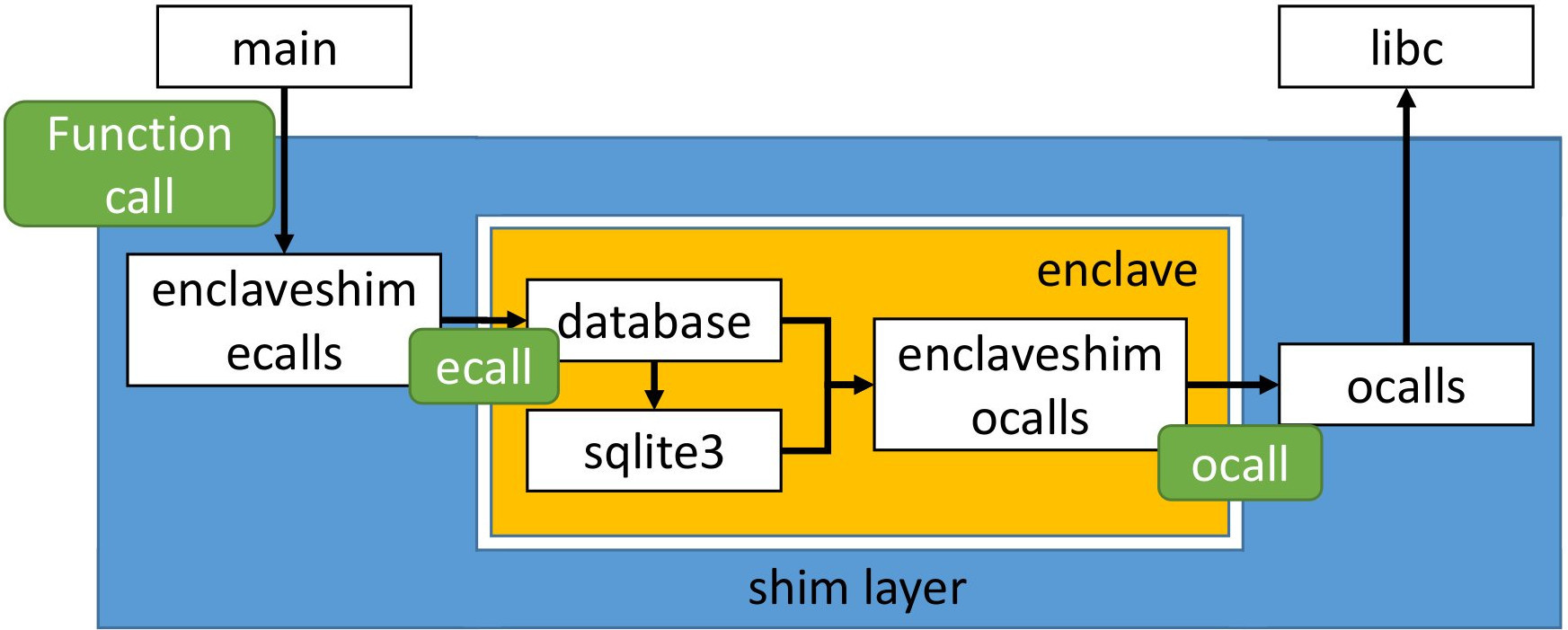
Figure 1 depicts the architecture of the source code: (i) the library is composed
of the database.[c+h] and sqlite3.[c+h] files; (ii) the enclave wrapper
is composed of the enclaveshim_* and ocalls.[c+h] files; and (iii) the main
function is present inside main.c . The enclave shim for ecalls redefines all the
functions that are exposed by the library, so that the main can transparently
call them without knowledge of the enclave. It is also in charge of initializing
the enclave. On the other side, the enclave shim for ocalls redefines all the
functions that do not exist inside the enclave (e.g., calls to libc ) so that the
in-enclave code can compile transparently. This shim layer implements the
code to make the ocalls to the real functions that live outside of the enclave.
2.2 Exercise: finish the implementation for Intel SGX
Your task is to add the necessary ecalls so that the code can be compiled
and executed with an SGX enclave.
While not necessary, you should read Makefile.sgx . First, it defines the
COMPILE_WITH_INTEL_SGX macro that you can use to detect if the code has to
be compiled with Intel SGX or not. Second, you will notice that the source
files are first pre-processed (flag -E ) and then compiled to an object file. This
step is necessary to ensure that all the definitions missing from the Intel SGX
SDK libraries have first been resolved by using the headers of the system.